History of Piso WiFi Philippines
Answer first: Piso WiFi grew in the Philippines, shop by shop, from coin-operated habits and timed computer shops, through DIY builds and named commercial platforms, to newer monitored dashboard systems, with no single inventor and no single launch date for all Piso WiFi supported by an official source checked for this site.
Pillar: Fundamentals guide · Same category: Captive Portal WiFi Monetisation · Forgot Admin Password
Piso WiFi did not arrive as a finished product from one company. It grew in the Philippines, piece by piece, from habits people already knew: paying a small coin for a short service, topping up in small amounts, and sharing a connection in a busy shop. This post tells that story in order. It is a deeper history narrative. It does not repeat the beginner definitions or the end to end explanation in the Fundamentals guide, and it does not repeat login, pause, or machine setup steps from their own guides.
A note on dates and inventors is needed at the start. No single inventor and no single launch date for all Piso WiFi is supported by an official source checked for this site. Any page that names one person or one year as the origin of the whole model should be treated with caution unless it cites an official platform history. What can be described with confidence is the sequence of ideas, the places where the model spread, and the shift from DIY builds to commercial platforms and then to newer monitoring systems.
Before Piso WiFi: A Country Used to Paying by the Coin
Long before WiFi vending, Filipinos were used to coin operated services. Coin operated phones in public places let a caller pay for a short call without owning a phone line. Later, computer shops sold time on a desktop by the minute or hour, a model readers still know as pisonet. Prepaid mobile load then made small, frequent top ups normal for millions of phone users.
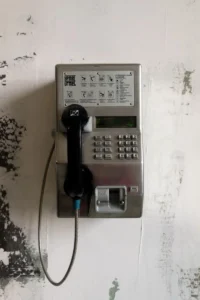
That background matters because Piso WiFi did not have to teach people a new payment habit. It only had to apply a familiar habit to a new need. A peso coin was already a unit people understood. A short paid session was already a format people trusted. A shop counter was already a place where small payments happened every day.
When smartphones spread, the gap became clear. Many people had a phone, but not a monthly home connection, and not always enough mobile data for a long session. A short, cheap, nearby WiFi session filled that gap, especially for students, workers on a break, boarding house residents, and people waiting in a terminal or market.
The Early DIY Phase: Builders Combine Three Existing Ideas
The earliest Piso WiFi machines were usually DIY builds. Small builders and shop owners combined three existing ideas that had not previously been sold together in this form: a coin slot that could read Philippine coins, a small control board that could run a hotspot portal and a timer, and a router that could share an existing internet connection.
These early builds were practical rather than polished. A builder might use a small single board computer, a coin acceptor, and open or commercial hotspot software, housed in a simple enclosure in a shop. Rates, pause behaviour, and voucher support varied from one build to the next, because each builder chose different software and different settings. That variation is one reason older guides disagree with each other: they were describing different builds, not one standard machine.
Word of mouth did much of the early spreading. A shop that added a machine brought in people who were already passing by. Neighbours saw a working machine, asked the owner how it was built or where it was bought, and the model moved from one street to the next. Online groups and seller pages later sped up that spread, but the first growth was local, shop by shop.
The Sari Sari Spread: Why Small Shops Became the Centre
Sari sari stores, boarding houses, terminals, waiting areas, and school gates became the natural home for Piso WiFi, and that placement shaped the whole model. These are places where people already wait, study, or pass through, and where a small payment feels normal.
For a shop owner, a machine added a service for customers who were already in the shop, and a small income stream through the day, rather than one large sale. For a customer, the machine was close, the payment was small, and there was a person nearby to ask if a coin was not credited. That human presence mattered in the early phase, when portals, coin calibration, and session rules were less standard than they are now.
Boarding houses added a second pattern. Residents needed evening internet for study and messages, without a monthly household plan. A machine in a boarding house, with mid tier time rates and later with vouchers, suited that daily rhythm better than a per visit cafe session. Terminals and waiting areas added a third pattern: short, one off sessions for travellers and workers, where a small tier and a quick portal mattered more than a weekly voucher.
As machines spread through shops, expectations also settled. Customers began to expect a visible sign with rates, a portal that showed remaining time, and a way to pause or at least to understand why pause was not offered. Operators who met those expectations kept customers. Operators who did not, with unclear rates or a coin slot that often failed, lost them. That pressure, from customers rather than from any single company, pushed the model toward clearer signs, better calibration, and more reliable portals.
The Platform Era: From Individual Builds to Named Systems
The next major shift was the growth of commercial platforms. Names such as LPB, AdoPiSoft, PisoFi, and JuanFi gave builders and owners a more standard portal, timer, voucher system, and admin panel, instead of each builder assembling every part alone. Each platform made different choices, and those choices still matter today.
LPB became known as a widely used commercial system with a portal, timer, and licence tiers. AdoPiSoft offered a different approach, including a pause limit counted in pauses rather than a single pause duration, and later features for builders. PisoFi added cloud based features, including session sync that could survive a reboot, voucher handling under the WiPass name, and wider admin tools for sales, clients, and desktop timers. JuanFi took a different route, built on MikroTik hardware and operator configured scripts, which suited builders who wanted more control and were comfortable configuring a hotspot themselves.
This platform era did not erase DIY building. It changed it. A builder could now start from a platform, rather than from raw software, and an owner who did not want to build could buy a ready machine running a named platform, with supplier support. That change also made guides more useful, because a guide could now describe a named platform path, rather than only a generic build.
It also created a new problem that still affects readers today. Platform features, defaults, and menu labels change by version, and guides written for one version can be wrong for another. A reader who follows an old LPB, AdoPiSoft, or PisoFi guide without checking the version on their own machine can waste time. That is why current guides on this site stress checking the build, the supplier documentation, and the machine itself, rather than trusting any single older list.
The Newer Era: Monitoring, Auto Pause, and Dashboard Machines
More recently, newer systems have added features that early DIY machines could not offer reliably. Ruijie and SmartFi, JLink, 1Click, and WiFi5Soft are examples named in operator discussions and in the Platforms Compared guide. Their reported strengths differ, and they should be checked against current official terms before buying, because newer systems change faster than older, settled platforms.
Two trends stand out in this newer era. The first is monitoring. Live coin counters, dashboards showing whether a machine is online, and remote checks of sales and sessions let an owner watch a machine without standing next to it. The second is smarter session handling, including auto pause when a device disconnects and resume on reconnect, reported for Ruijie and SmartFi systems. Both trends reduce the need for constant on site checking, but they do not remove the need for local work: cash collection, cleaning, coin calibration, repairs, and customer help still require a person on site.
A related trend is the growth of combined services on one system. Some platforms now support WiFi timers, desktop timers, charging, and e-loading in one setup. That combination suits a computer shop or a busy store better than a WiFi only machine, but it also makes setup and admin more complex. The history here is therefore not a straight line from simple to complex for every owner. It is a widening range: simple coin WiFi machines still exist, and fuller shop systems exist alongside them, for different owners and different locations.
What Changed, and What Stayed the Same
Several things changed across these phases. Machines moved from rough DIY enclosures to ready made units and dashboard systems. Portals moved from basic timers to voucher systems, pause controls, cloud sync, and remote monitoring. Support moved from a single builder to platform suppliers, seller pages, and operator groups. Information moved from word of mouth to online guides, videos, and seller listings, which also brought more unreliable claims to check.
Several things stayed the same, and they explain why the model still works. Payment stayed small and prepaid. The customer stayed local, using one machine at a time, with one operator. The shop stayed central, because foot traffic, not technology alone, decides whether a machine earns. And the core tension stayed the same: a machine must be cheap enough for a customer to try, reliable enough for a customer to return, and simple enough for an owner to maintain.
That tension also explains the honest business story told in the Business guide. Early enthusiasm sometimes promised quick returns, but operator experience shows that location, home WiFi competition, ISP cost, electricity, load costs, and maintenance all affect results. The model survived not because every machine earned well, but because in the right location, with the right rates and upkeep, it solved a real, repeated need.
How to Read Old History Claims With Care
Because Piso WiFi grew from many builders, old claims about its history often mix up different things. Use these checks before trusting a history claim.
First, check whether the claim is about one platform or about all Piso WiFi. A platform launch is not the launch of the whole model. Second, check whether a date refers to a platform version, a seller listing, or a guide publication date, rather than to the invention of coin WiFi itself. Third, check whether a feature claim matches the version on your own machine. A feature added in a newer version may not exist on an older build. Fourth, prefer official platform histories and official feature lists over seller pages and copied guides when a claim matters for a purchase or a setup decision.
If a history page cannot show its source, treat its dates and inventor claims as unverified, even if the rest of the page is useful. The story in this post, in sequence rather than in single dates, is the safer way to understand how Piso WiFi reached its current form.
Names Reported in Operator Discussions, and Similar Models Elsewhere
Operator discussions also name Sky, Twin J, SmartFi, and FoxPisoWiFi. Treat those only as names reported in operator discussions, verify their current terms and support before relying on them, and do not assume a full feature list for any of them from a name alone. The word vindo also appears in searches, but it is a misspelling of vendo, the physical machine, not a separate system.
For worldwide scope, keep the distinction clear. The Piso brand and its coin vendo and captive portal style remain centered in the Philippines, with no global Piso network and no central coverage map. Similar pay per use hotspot models reported elsewhere, such as WiFi Koin in Indonesia, Vietnam, and Thailand, elements of the PM-WANI framework in India, and voucher setups in parts of Latin America and Africa, are similar models, not Piso WiFi itself. Do not present them as Piso WiFi coverage.
Frequently Asked Questions About the History of Piso WiFi
Did piso wifi start with one company?
No, on the evidence checked for this site. Piso WiFi grew from many builders and operators combining coin vending, WiFi hotspots, and prepaid timers, with commercial platforms growing later around that demand. A single company launch does not explain DIY builds, shop spread, and multiple platforms.
What came first, coin phones, pisonet, or piso wifi?
Coin operated phones and timed desktop shops came before Piso WiFi as a WiFi model. They are part of the background, not the same service. Piso WiFi applied the small paid session idea to WiFi on a customer’s own phone or laptop, rather than to a phone call or a shop desktop.
Why did sari sari stores matter so much in the early spread?
Sari sari stores already had foot traffic, small payments, and a trusted owner nearby. A machine there did not need to attract a new audience from scratch. It served people who were already waiting, shopping, or passing through, and the owner could help when a payment failed.
When did named platforms replace DIY builds?
There was no single switch date. Named platforms grew over time as builders and owners wanted more standard portals, timers, vouchers, and admin tools. DIY building continued alongside ready machines, and still continues for builders who want more control, as with JuanFi and MikroTik based setups.
Why do older guides disagree about pause, defaults, and menus?
Older guides often described different builds, different platforms, or different versions. Pause behaviour, defaults, and menu labels vary by platform and version. Always check the platform, version, and supplier documentation for your own machine before following an older guide.
Is piso wifi still growing, or is it declining?
Both patterns exist, depending on location. In places with strong foot traffic and limited home WiFi, machines still serve a clear need. In places where home WiFi has become cheap and common, demand for short paid sessions has fallen. Operator reports of thin margins in some areas reflect that local difference, not a single national trend.
What is the most reliable way to learn the history of a specific platform?
Check that platform’s official site and official feature history first, then check the platform guide on this site for how that platform differs from others. Seller pages and copied guides are useful for leads, but they are not a substitute for an official source when a date, licence, or feature matters.
What to Read Next
If you want the beginner explanation of what Piso WiFi is today, go to the Fundamentals guide. If you want to compare the platforms named in this history, go to the Platforms Compared guide. If you want business factors, including location, costs, and honest income factors, go to the Business guide. If you want to know how a machine is chosen and set up today, go to the Vendo pillar. Each of those pages covers its own topic in full, so this post stays a history narrative and does not repeat their definitions, steps, or comparisons.