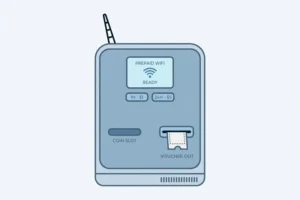
A piso wifi vendo machine is the physical unit that sells internet time. It is the box you see in a store, a boarding house, or a waiting area, with a coin slot, a WiFi signal, and a portal that starts a timer after you pay.
This is the full vendo machine guide. The homepage gives only a short summary of vendo machines and links here for the detail. The Login pillar covers how a customer logs in at 10.0.0.1. The Pause Time pillar covers pausing and resuming a paid session. This page covers the machine itself: what types exist, what parts do what, how to choose between a ready made unit and a DIY build, how to set one up in plain terms, how to maintain it, and what to check before you buy one.
Answer: It is a small hotspot unit that combines hardware and software. The hardware takes payment and creates a WiFi network, while the software runs the portal and the timer.
What Is a Piso WiFi Vendo Machine?
A vendo machine, also written as vending machine in some listings, is a small hotspot unit that combines hardware and software. The hardware takes payment and creates a WiFi network. The software runs the portal, the timer, the rates, and the admin panel.
The machine does not create internet on its own. It shares an existing internet connection from an internet service provider, such as PLDT, Globe, or Converge in the Philippines, or from a mobile SIM connection, through a router and an access point. If the internet connection feeding the machine is down, the machine portal may still open, but customers will not be able to browse. That distinction helps when you are diagnosing a problem: a portal problem and an internet problem are not the same thing.
A vendo machine is also called a piso wifi machine, a coin WiFi machine, and, in some listings, a piso wifi vendo. Those names describe the same idea, with different hardware and software behind them. Always check the platform, the parts list, and the licence terms in a listing, not only the name on the box.
Types of Piso WiFi Vendo Machines
Machines differ mainly by where they are used, how customers pay, and how they are built. The table below gives the main types. After the table, each type is explained in plain English.
| Type | Best for | Main limitation |
|---|---|---|
| Indoor plug and play unit | Stores, boarding houses, waiting areas, small shops | Limited range outdoors, and one payment area |
| Outdoor unit | Yards, markets, terminals, open waiting areas | Needs weather protection, a stable power supply, and a secure mount |
| Multi coinslot unit | Busy locations with queues at one slot | More parts to calibrate and maintain |
| Sub vendo unit | Expanding coverage to a second spot without a second full machine | Depends on the main machine, and needs a reliable link to it |
| Bill acceptor unit | Locations where customers carry paper money more than coins | Higher parts cost, and bills need a secure cash box |
| Desktop and charging combo unit | Computer shops, also called pisonet setups, and charging stations | More complex setup, with separate WiFi and desktop timers on some platforms |
| DIY build | Builders who already work with networks and small boards | No single support desk, and the builder is responsible for wiring, software, and calibration |
Indoor plug and play unit
An indoor plug and play unit arrives assembled, with software installed and, usually, a licence and some support. You connect it to power and to your internet connection, set rates and a WiFi name in the admin panel, and start selling time. This type suits a first machine in a shop or boarding house, because setup time is short and the supplier can help with the first problems.
Check what is included before you buy: the control board, the coin slot, the router or access point, the antenna, the power supply, the enclosure, and the software licence. A listing that says “complete set” but leaves out the licence or the access point is not complete in practice.
Outdoor unit
An outdoor unit uses a weather resistant enclosure, an outdoor access point, and a secure mount. It also needs a power supply that can handle outdoor conditions and, ideally, a UPS for short power cuts. A UPS is an uninterruptible power supply that keeps the machine running briefly during a short cut.
Outdoor range depends more on the access point and antenna than on the box itself. A good outdoor access point in an open area can reach much farther than an indoor router behind a wall, but walls, trees, metal roofs, and rain all reduce range in practice. Do not trust a single range number in a listing. Test the signal in the actual location, at the spots where customers will sit, before you promise coverage.
Multi coinslot and sub vendo units
A multi coinslot unit has more than one coin slot, so several customers can insert coins at the same time without queuing at one slot. AdoPiSoft lists multiple wired and wireless coin acceptors as a feature, with simultaneous coin insertion. PisoFi lists sub vendo support, with a main vendo and additional sub vendos connected through a module, often an ESP8266 based module in its feature list.
A sub vendo is not a second full machine. It is an extension that lets customers pay at a second spot while the main machine controls the session. That helps in a large shop or a two floor building, but it also adds a link that can fail. If the sub vendo loses its link to the main machine, customers at that spot cannot pay, even if the main machine is working. Test the link at both spots before you open for customers.
Bill acceptor, desktop, and charging combos
A bill acceptor lets customers pay with paper money instead of coins. That helps where coins are scarce, but it adds a cash box that must be emptied and secured, and bills must be checked for jams and false reads.
A desktop combo, used in computer shops, adds timed desktop computers alongside WiFi. PisoFi lists separate WiFi and desktop timers, with a dedicated desktop application for Windows for lockscreen and time monitoring. That setup needs separate rates for WiFi and desktop use, and separate pause rules, because a desktop timer and a WiFi timer do not always behave the same way.
A charging combo adds phone charging ports to the same unit. That is useful in waiting areas, but charging needs its own power budget. If charging draws too much power, the control board and access point can become unstable. Check the power supply rating for the full combo, not only for the WiFi part.
DIY build
A DIY build uses parts you assemble yourself: a small board, a coin acceptor, a microSD card, a router or access point, an enclosure, and a power supply. Common boards for AdoPiSoft, from its official site, are Raspberry Pi 3 and 4, described as the most reliable boards for its system, Orange Pi as a lower cost alternative, and Newifi 3 D2 as a combined board and access point option. Larger setups can use an x64 server, which AdoPiSoft lists for thousands of users, but that is not a typical first machine.
A DIY build can cost less and teaches you how the system works. It also makes you the support desk. If a wire loosens, a microSD card fails, or a coin slot drifts out of calibration, you fix it. For a builder who already works with networks, that trade is often worth it. For a first machine in a busy shop, a supported plug and play unit usually saves more time than it costs.
Parts of a Vendo Machine, in Plain English
Every vendo machine, whatever its type, has the same core parts. The table below lists each part, what it does, and what fails most often.
| Part | What it does | Common failure to watch for |
|---|---|---|
| Enclosure and mount | Protects the parts, holds the coin slot, and locks the cash inside | Water entry outdoors, a weak lock, or a mount that shakes loose |
| Coin slot, also called a coin acceptor | Reads coins and tells the board how much was paid | Jam, wrong denomination credit, or drift out of calibration |
| Control board | Runs the portal, timer, payment logic, and admin panel | MicroSD card failure, overheating, or a loose power connector |
| Router or access point | Creates the WiFi network customers join | Weak signal, wrong placement, or a reboot loop after a firmware update |
| Antenna | Sends and receives the WiFi signal | Wrong antenna for the location, a loose connector, or a blocked line of sight |
| Power supply and UPS | Powers the board, access point, and coin slot, and bridges short cuts | Underpowered supply for a combo unit, or a dead UPS battery |
| Internet source | Supplies the internet that the machine shares, from a wired ISP or a SIM modem | ISP outage, a loose cable, or a SIM modem that drops connection |
Coin slot and calibration
Coin calibration is the setting that tells the coin slot which coins to accept and how much each coin is worth. Philippine coins change over time, and a slot calibrated for one set of coins may reject a new coin, or credit the wrong amount for it. Calibrate with clean coins of each denomination you accept, test each denomination after calibration, and recheck after any repair that moves the slot.
If a coin is accepted but no time appears, stop inserting coins. That problem can be a portal issue, a session issue, or a calibration issue, and more coins will not fix it. Note the amount and time, and follow the login checks in the Login pillar before you open the machine.
Control board and storage
The control board is a small computer. On many DIY and small commercial machines, the software runs from a microSD card. MicroSD cards wear out, especially with frequent writes and with sudden power cuts. Keep a backup of your settings and, where the platform allows it, a backup image of the card. PisoFi lists backup and restore for settings, data, and promos in its official feature list. Use that feature if your platform offers it, before you change rates or update firmware.
Heat is the other board killer. A sealed box in direct sun can overheat a board and cause random reboots. Give the enclosure ventilation, keep it out of direct sun where you can, and check for reboots on hot days before you assume a software bug.
Router, access point, and range extension
Range extension means adding an access point farther from the main machine so customers in a yard, a second room, or a waiting area can still connect. AdoPiSoft lists compatibility with access points that can reach from 50 metres to as far as 200 metres of WiFi signal range, depending on the access point and the environment. Treat that as a range of possible access points, not as a promise for your location.
For range extension, place the access point high, clear of metal, and close to where customers sit. Test with a phone at each customer spot, not only next to the machine. If the signal is strong next to the machine but weak where customers sit, you need a better placed access point, not a stronger coin slot.
Plug and Play Versus DIY: How to Decide
Use this comparison for the decision, not only for price. Price alone hides licence, support, and repair time.
| Factor | Plug and play | DIY build |
|---|---|---|
| Setup time | Short, often a day or less for first setup | Longer, with wiring, software install, and calibration |
| Support | Supplier support, if included in the purchase | Community help and your own troubleshooting |
| Licence | Often included, check the terms and renewal | Check the platform licence separately, including Community Edition limits |
| Repair | Supplier parts and guidance, if included | You source parts and diagnose faults |
| Customisation | Limited to admin panel settings and portal branding where offered | Full control over parts, enclosure, and software setup |
| Best for | First machine, busy shop, owner who wants to sell time, not build hardware | Builder, second machine, or owner who already maintains networks |
Ask the supplier these questions before you buy either type: What platform and version is installed? Is the licence included, and does it renew yearly or is it perpetual? What parts are included, and what is missing? What support is included, and for how long? What happens after a power cut, and does the machine keep paused sessions? What is the warranty on the board, the coin slot, and the access point separately? A clear answer to those questions is worth more than a low headline price.
How Much Does a Piso WiFi Vendo Machine Cost?
Summary only. There is no fixed national price for a vendo machine, because prices change with parts, platform licence, enclosure, access point, and supplier support. A machine with a better access point, a bill acceptor, a charging combo, or a larger licence will cost more than a basic indoor coin unit, while a DIY build can cost less in parts but adds your time for assembly, calibration, and repair. When you compare prices, compare the full set, not only the box, including the control board, coin slot, access point, antenna, power supply, enclosure, and licence, plus the internet connection that will feed the machine.
For the full price guide, including total first year cost and what is included versus excluded, see the post How Much Does a Piso WiFi Vendo Cost. That post is the canonical page for machine price, so this pillar keeps only this summary and a link by page name to it, rather than repeating the full price detail here. For income and cost planning, use the Business guide, which is linked at the end of this page.
Setting Up a Vendo Machine: Overview Only
Full admin steps, including rates, WiFi name, passwords, and pause settings, are in the Admin Login guide. Full platform setup differences are in the Platforms Compared guide. This section gives the owner the order of work, so you do not set rates before you have tested the hardware.
Setup order that avoids rework
- Choose the location and test the internet source there, with a phone and a laptop, before you mount anything.
- Mount the machine securely, with ventilation, a lock, and, outdoors, weather protection.
- Connect power, with a UPS if you use one, and check that the board and access point stay on during a short power test.
- Connect the internet source and check that a laptop connected directly to that source can browse.
- Log in to the admin panel from the machine network, change default admin passwords, and set the WiFi name.
- Set rates, payment modes, and pause rules, and test each payment mode as a customer with a small payment.
- Test range at each customer spot, test coin calibration with each denomination, and test a voucher code if you offer vouchers.
- Put up a sign with the WiFi name, the rates, the pause rule, and what to do if a coin is not credited.
Do not advertise the machine until steps 6 and 7 pass. A machine that takes money but does not give time on day one will lose customers faster than a machine that opens a day later but works.
Maintaining a Vendo Machine
Maintenance is mostly cleaning, checking, and backing up. The table below gives a simple schedule. Adjust it for a busy or outdoor location, where checks need to be more frequent.
| When | What to check |
|---|---|
| Daily, busy location | Coin slot clear, portal loads, timer starts on a test payment, cash box secure |
| Weekly | Signal at customer spots, coin calibration with each denomination, session list for stuck sessions, sales report matches cash collected |
| Monthly | Firmware update check, settings backup, power supply and UPS battery check, enclosure and lock check, antenna connector check |
| After any power cut or repair | Portal loads, rates still correct, WiFi name still correct, a test coin payment gives time, a test voucher code works if you offer vouchers |
For owners only, two checks from recent operator reports are worth adding to that schedule. First, a coin pulse calibration mismatch can credit the wrong amount even when the coin is accepted, so test each denomination against the rate it should give, and recalibrate when a denomination is consistently wrong. Second, heat and wiring matter as much as the coin slot: keep ventilation clear, add fans or heat sinks only as a builder or owner check for an outdoor box, and ground the coin selector wiring as the supplier diagram shows, because a loose ground can cause missing or ghost credits on some DIY builds. Customers should not open a machine to do these checks.
Hardware costs also need category labels, not one price. A DIY kit, a ready made vendo box, a custom or preassembled unit, and a hardware package are different categories, with different parts, licences, and support included. Compare a supplier quote by category and by what is included, rather than comparing one headline price across categories. Full price guidance is in the post How Much Does a Piso WiFi Vendo Cost, which is the canonical page for machine price.
Keep a simple log: date, what you checked, what you changed, and what you collected. That log makes warranty claims easier, and it shows whether a coin slot problem is new or recurring.
Vendo Machine Problems, By Part
This section gives machine part diagnosis only. Login and portal fixes are in the Login pillar. Pause fixes are in the Pause Time pillar. Full connection, speed, and hardware troubleshooting is in the Troubleshooting guide. Do not repeat those guides here. Use this table to decide which part to check first.
| Symptom | Most likely part to check first | What to do next |
|---|---|---|
| Coin slot jams | Coin slot and coin path | Clear the jam with the machine off, check for bent or foreign coins, and retest with clean coins |
| Coin accepted, but no time | Coin calibration, portal session, or control board | Stop inserting coins, check the portal timer, then check calibration with each denomination |
| Machine portal loads, but no browsing | Internet source, router, or ISP | Check a laptop connected directly to the internet source. If that fails, the problem is upstream, not the vendo box |
| WiFi signal weak at customer spots | Access point placement or antenna | Move the access point higher and clearer, check the antenna connector, and retest at each spot |
| Machine reboots randomly | Power supply, heat, or microSD card | Check the power supply rating for the full combo, check ventilation, and check the card and backup |
| Sub vendo customers cannot pay | Link between sub vendo and main machine | Check the sub vendo link and status in the admin panel, and test a payment at the main machine first |
| Cash collected does not match sales report | Coin calibration, voucher handling, or a cash box issue | Compare the sales report by date, check voucher redemptions separately, and check calibration before you assume theft |
Safety and Placement
Place the machine where customers can use it without blocking a walkway, and where the operator can see it. Lock the enclosure and the cash box. Keep power cables out of walkways and out of water. Outdoors, keep the enclosure out of direct rain and direct sun where you can, and check the seal after storms.
Do not place a machine where it blocks emergency access, and do not run extension cables across a public path without protection. For a machine in a school or a public building, check with the building owner about placement, power, and who is responsible for the machine after hours.
Frequently Asked Questions About Piso WiFi Vendo Machines
What is a piso wifi vendo machine?
It is a physical hotspot unit that sells internet time. Customers pay by coin, voucher, or an accepted e-wallet, and the machine gives their device a timed session through a portal at 10.0.0.1 or at the gateway address for that machine.
How much does a piso wifi vendo machine cost?
It varies with parts, platform licence, enclosure, access point, and supplier support. There is no single fixed price. Compare the full set, including board, coin slot, access point, antenna, power supply, enclosure, and licence, and check the supplier price at the time you buy.
Can I build my own piso wifi vendo machine?
Yes, if you can wire parts, install software, calibrate a coin slot, and troubleshoot network problems. Common boards for AdoPiSoft are Raspberry Pi, Orange Pi, and Newifi, from its official site. A DIY build gives control, but you become the support desk. A plug and play unit suits a first machine in a busy shop.
How many users can one vendo machine support?
It depends on the board, the access point, the platform licence, and the internet speed feeding the machine. A small board with a basic access point suits a small shop. A larger server based setup, or a commercial licence with a higher user limit, suits a busy location. Check the licence user limit and the internet speed together, because a high user limit with a slow internet connection will still feel slow.
How far does a piso wifi vendo machine reach?
It depends on the access point, the antenna, walls, trees, and weather. AdoPiSoft lists access points with a range from 50 metres to as far as 200 metres, depending on the access point and environment. Test the signal at each customer spot in your actual location, rather than trusting a single range number.
What should I do if the coin slot jams?
Turn the machine off if the supplier guide says to do so for clearing a jam, clear the jam carefully, check for bent or foreign coins, and retest with clean coins. If jams keep happening, check calibration and the coin path before you replace the slot. Do not force coins into a jammed slot.
Do I need a licence to run a piso wifi vendo machine?
You need the software licence for the platform you use, and you may need local business and tax requirements, depending on where you operate. Software licence terms differ by platform and version. Business, permit, and tax rules differ by location and by how you operate. The Business guide covers those factors in full, with the caution that you should check current local rules before you invest.
Is a vendo machine the same as a piso wifi router?
No. A router creates a WiFi network, but it does not take coins, run a portal, or sell timed sessions on its own. A vendo machine combines a router or access point with a coin slot, a control board, and vending software. The router is one part of the machine, not the whole machine.
What to Read Next
If you are a customer who needs to log in, go to the Login pillar. If you have a paid session and need to pause it, go to the Pause Time pillar. If you are an owner who needs to change settings, go to the Admin Login guide. If you want to compare platforms before you buy, go to the Platforms Compared guide. If you want income, cost, location, and permit factors, go to the Business guide. If the machine, portal, or connection is not working, go to the Troubleshooting guide. Each page covers its own topic in full, so this page does not repeat their steps.